Platform

Seven frameworks. One workspace.

Run the EU AI Act, GDPR, NIS2 (Sweden), ISO 27001, ISO 42001 and ISO 9001, plus the DORA ICT third-party register, on shared controls, risks, suppliers, documents and actions. Work you do once counts toward every requirement you link it to.
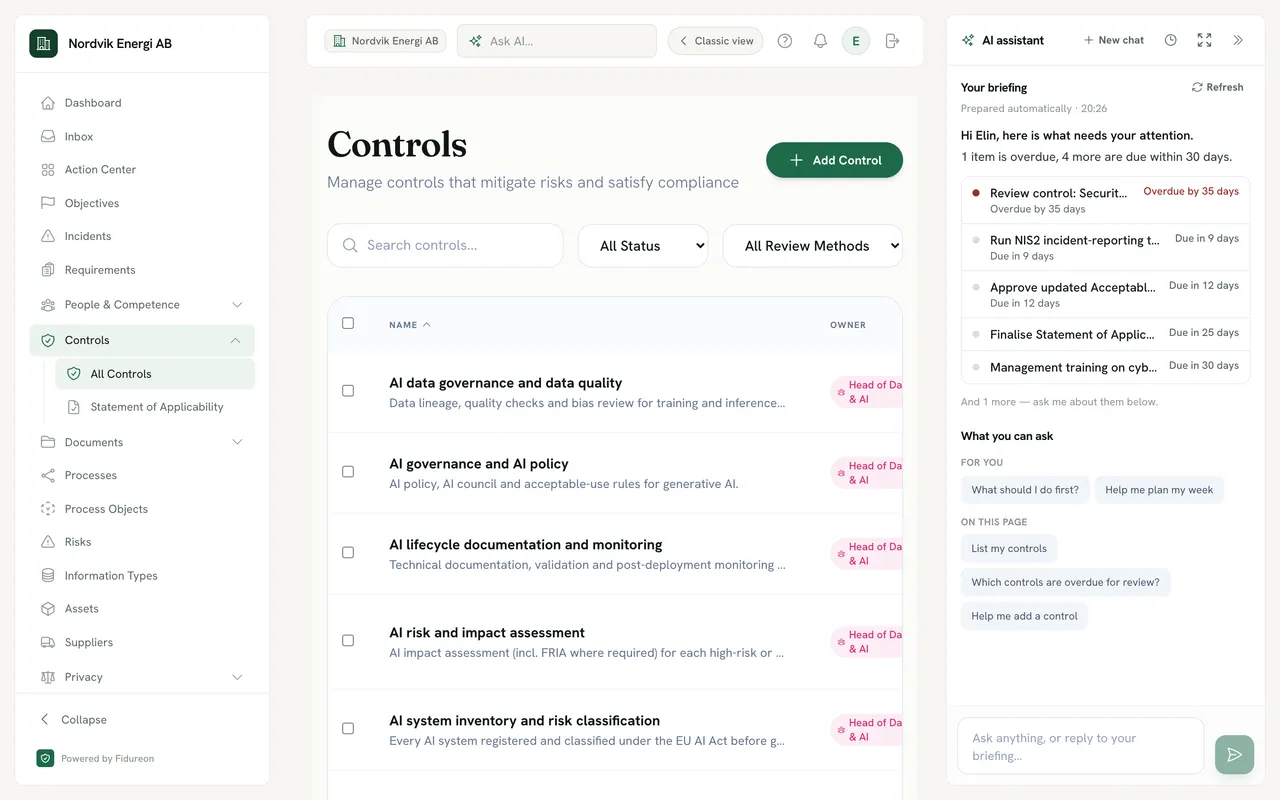

Fidureon for a demo energy company: the navigation with Controls open (All Controls, Statement of Applicability), the control library with AI governance controls such as “AI data governance and data quality” and “AI risk and impact assessment”, and the AI assistant pane on the right. Its briefing, prepared automatically, lists one overdue control review and four items due within 30 days; below it, “What you can ask” suggests “List my controls”, “Which controls are overdue for review?” and “Help me add a control”.
The AI pane’s suggestions on the controls page: for you, “What should I do first?” and “Help me plan my week”; on this page, “List my controls”, “Which controls are overdue for review?” and “Help me add a control”.
Statement of Applicability summary for ISO 27001:2022 Annex A, version 2022.1.0 with 93 Annex A controls: 92 applicable, 1 excluded, 56 complete, 37 in progress, 0 not started.
The control library, with the AI pane beside it: a briefing built from what is due for you, and questions about this page. Lifted out: the Annex A summary of the Statement of Applicability. Product screens show a fictional demo company.On every page, the AI pane suggests questions about that page; here, your controls. Product screens show a fictional demo company.

Work once

Do the work once. It counts everywhere it applies.

Link a control to every requirement it meets, across frameworks. The actions behind it then drive the status of each of those requirements and one compliance number per framework.

One control, many requirements.

One control Supplier security An owner, a review cycle, the actions that implement it and the evidence behind it.
  • ISO 27001 A.5.19 Information security in supplier relationships
  • NIS2 (Sweden) 2:3.4 Supply-chain security
  • GDPR Art. 28 Processors
  • ISO 42001 A.10.3 Suppliers
An example. Your team makes each link, by hand or by accepting the suggestions Fidureon offers when you import controls.

Status that follows the work.

Gaps become proposed actions. Committed actions are planned, done and counted, and each plan shows its progress from the actions behind it.

  • Proposed gap actions A requirement no healthy control covers yet becomes a proposed action you can add to a plan.
  • A plan per goal Each compliance plan has its own tab and progress, such as AI Act readiness, a Cybersäkerhetslagen programme or ISO 27001 certification.
  • Progress from actions A plan’s progress counts the actions that are done. Nobody types in a percentage.
The Action Center: switching between compliance plans, then adding a proposed gap action to the ISO 27001 plan.

Processes

Draw how you work. Get your registers.

Create assets, information types and suppliers right on the canvas. The links fill themselves in, and your Article 30 register builds from them.
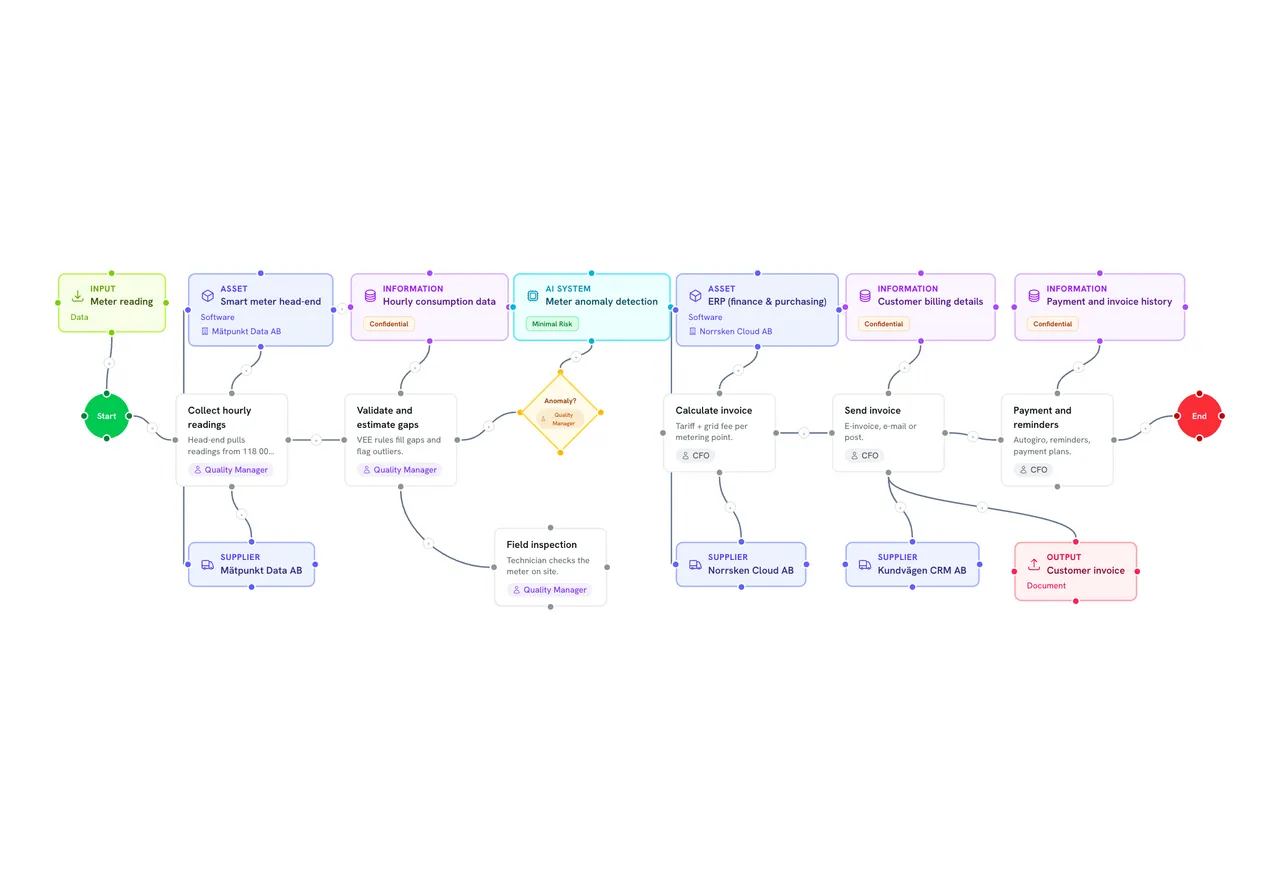
The Meter-to-cash (billing) process diagram: from Start through Collect hourly readings, Validate and estimate gaps, an Anomaly? decision, Calculate invoice, Send invoice and Payment and reminders to End, with linked asset, information type, supplier, AI system, input and output nodes.
A process on the canvas: each step beside the assets, information types, suppliers and AI system it uses.Each step on the canvas sits beside the records it uses.

On the canvas

Create the record where you draw it.

  1. Drop a record onto the diagram. Assets, information types, suppliers and AI systems sit in the palette beside steps and decisions. Pick a record you already have.
  2. Or create it on the spot. Quick Create makes the real register record, with its classification, and links it to the node in one step.
  3. Connect it to the step that uses it. Drawing alone never adds rows to a register: every record on the canvas is one you picked or created.
Recorded in the product: an information type is created on the canvas with Create & Link, then connected to the Field inspection step.

On save

The links fill themselves in.

When you save, the process is linked to every record on it. The edges count too: an information type drawn to an asset, and an asset drawn to its supplier, become links in the registers.
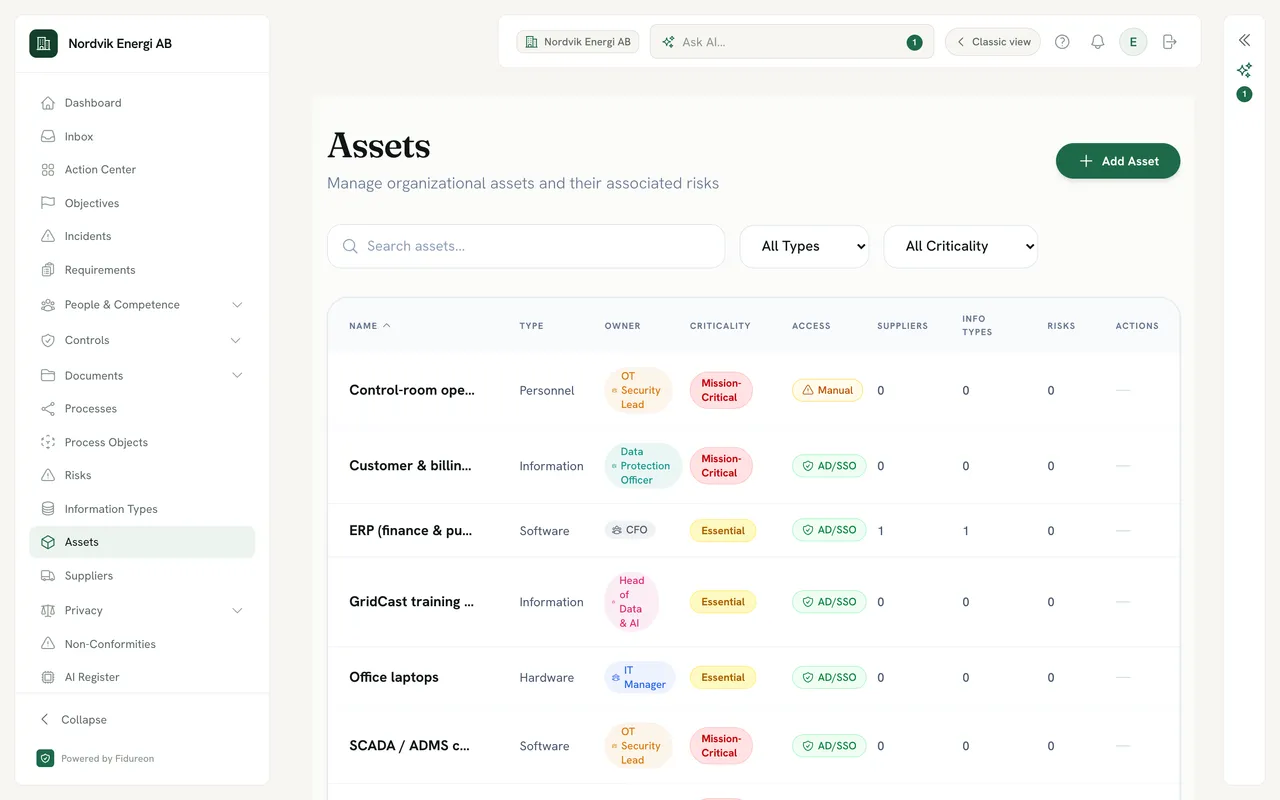
  • Assets Each asset shows the suppliers and information types linked to it.
  • Information types Each type shows its classification, its owner and the assets that hold it.
  • Processes Each process shows how many assets and data types its diagram links.
Asset register for a demo company: assets such as Control-room operators, Customer and billing data, ERP (finance and purchasing) and GridCast training data, each with a type, an owning role, a criticality and an access method, and counts of linked suppliers and information types; the ERP system shows 1 supplier and 1 information type.
The asset register: each asset with the suppliers and information types linked to it.

GDPR Article 30

Your Article 30 register builds from them.

Mark a process as personal-data processing and it becomes a record of processing: its purpose, the information types linked to it and the suppliers that process them. Export the register as CSV.
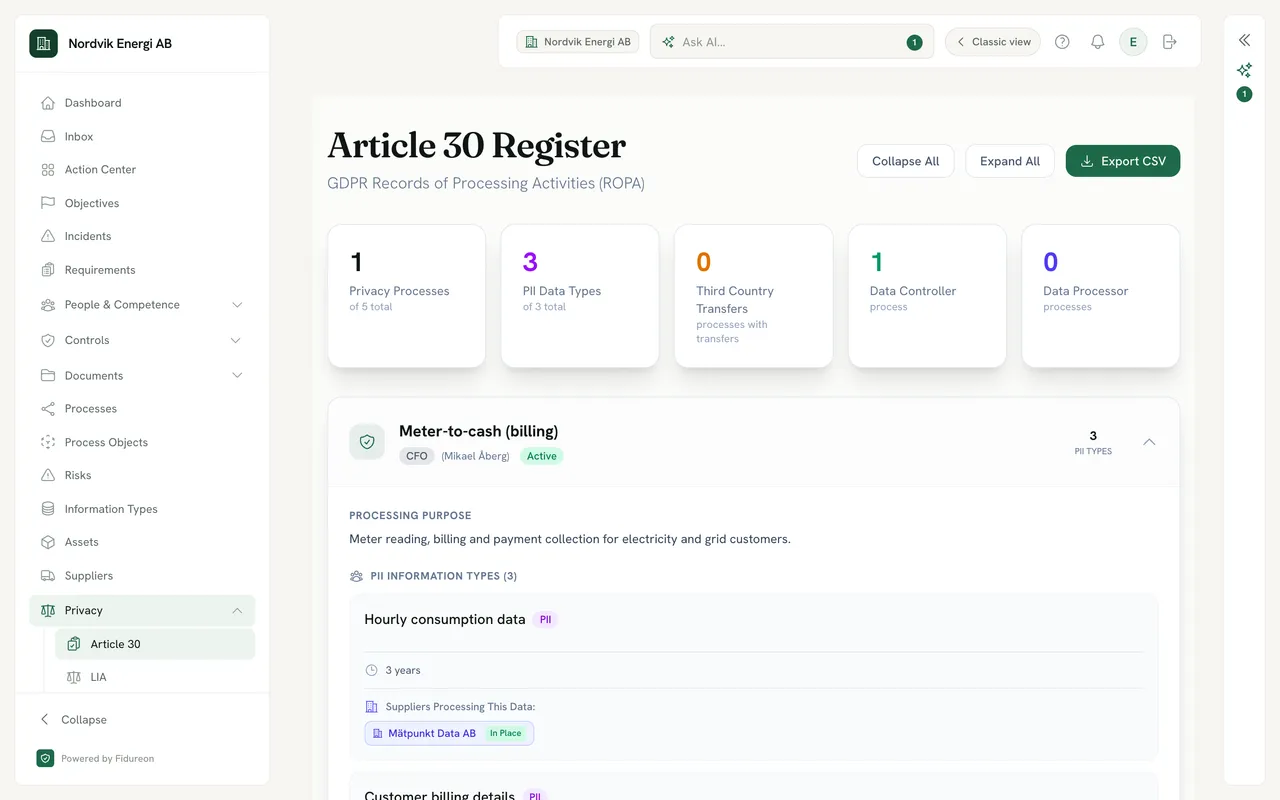
Article 30 Register, GDPR records of processing activities, with an Export CSV button: 1 privacy process of 5, 3 PII data types of 3, 0 third-country transfers, 1 data controller process and 0 data processor processes; below, the Meter-to-cash (billing) record, owner CFO, Active, with its processing purpose, meter reading, billing and payment collection for electricity and grid customers.
The Article 30 register: one record per process marked as personal-data processing.A record in the Article 30 register: its information types and the supplier processing them.
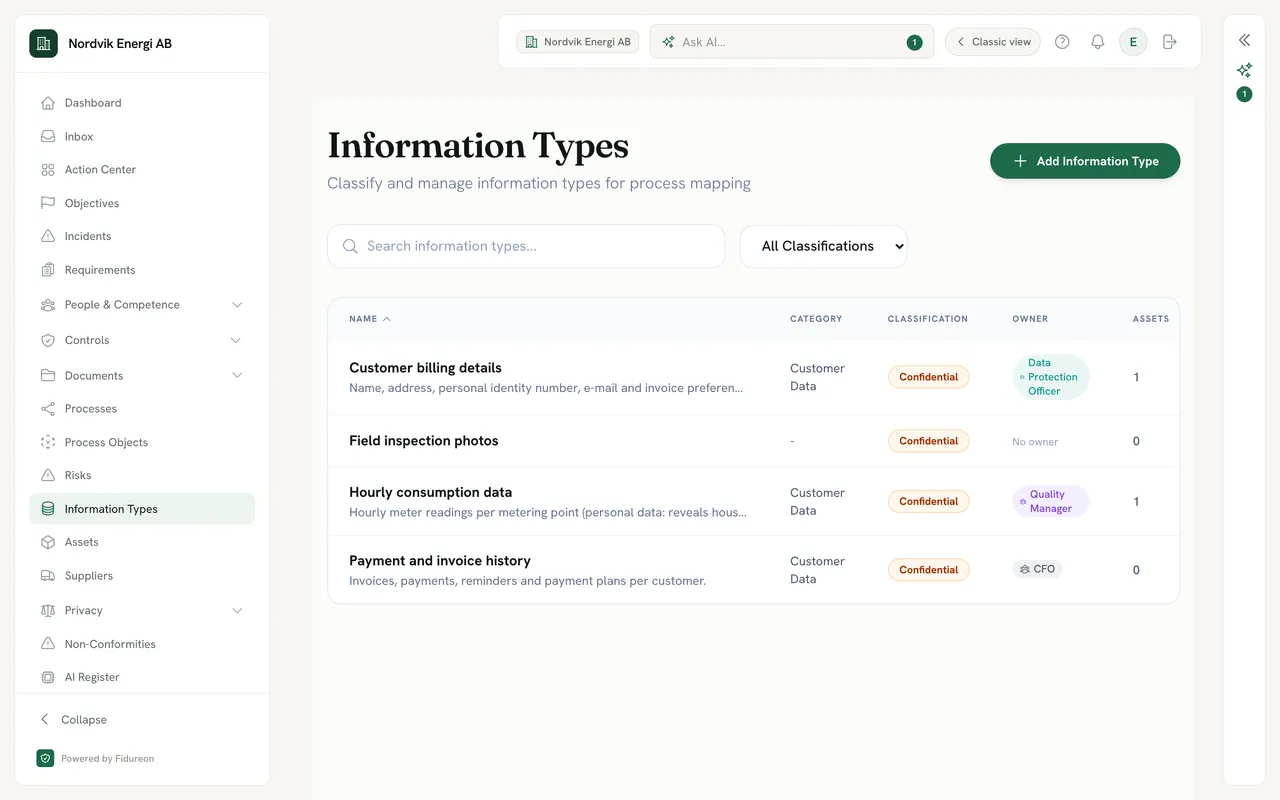
Information Types register of a demo company: Customer billing details, Field inspection photos (just created on the canvas), Hourly consumption data and Payment and invoice history.

Created on the canvas, listed in the register

A record made with Quick Create is a full register entry at once. Add its owner and description when you are ready.
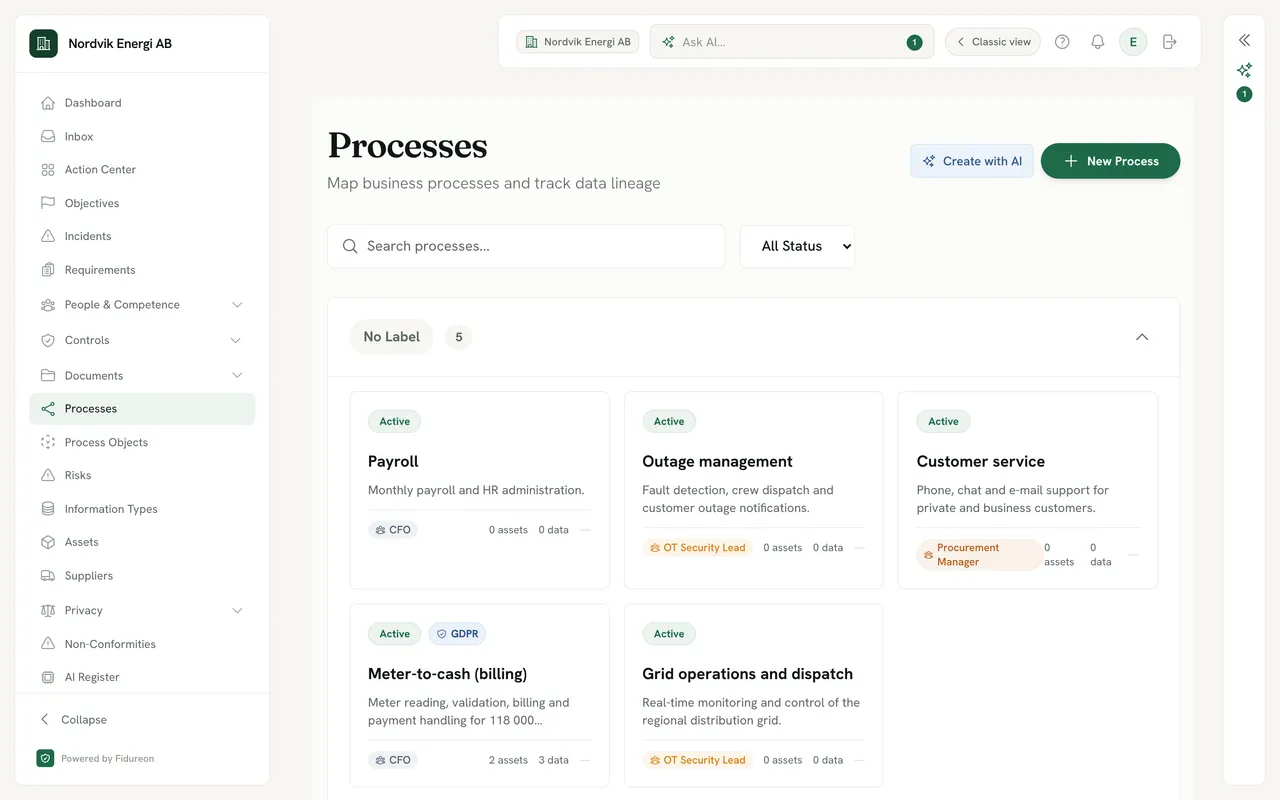
A process card from a demo company: Meter-to-cash (billing), Active, with a GDPR badge, owner CFO, and 2 assets and 3 data types linked from its diagram.

Every process shows what it touches

The process list counts the assets and data its diagram links, and badges the ones that process personal data.

Experimental You can also ask the AI Process Builder to draft changes to a diagram. It only links to records that already exist; creating them stays with you.

AI throughout

An assistant beside every page.

The AI pane sits next to your work on every page: a briefing built from what is due for you, and questions that fit where you are.
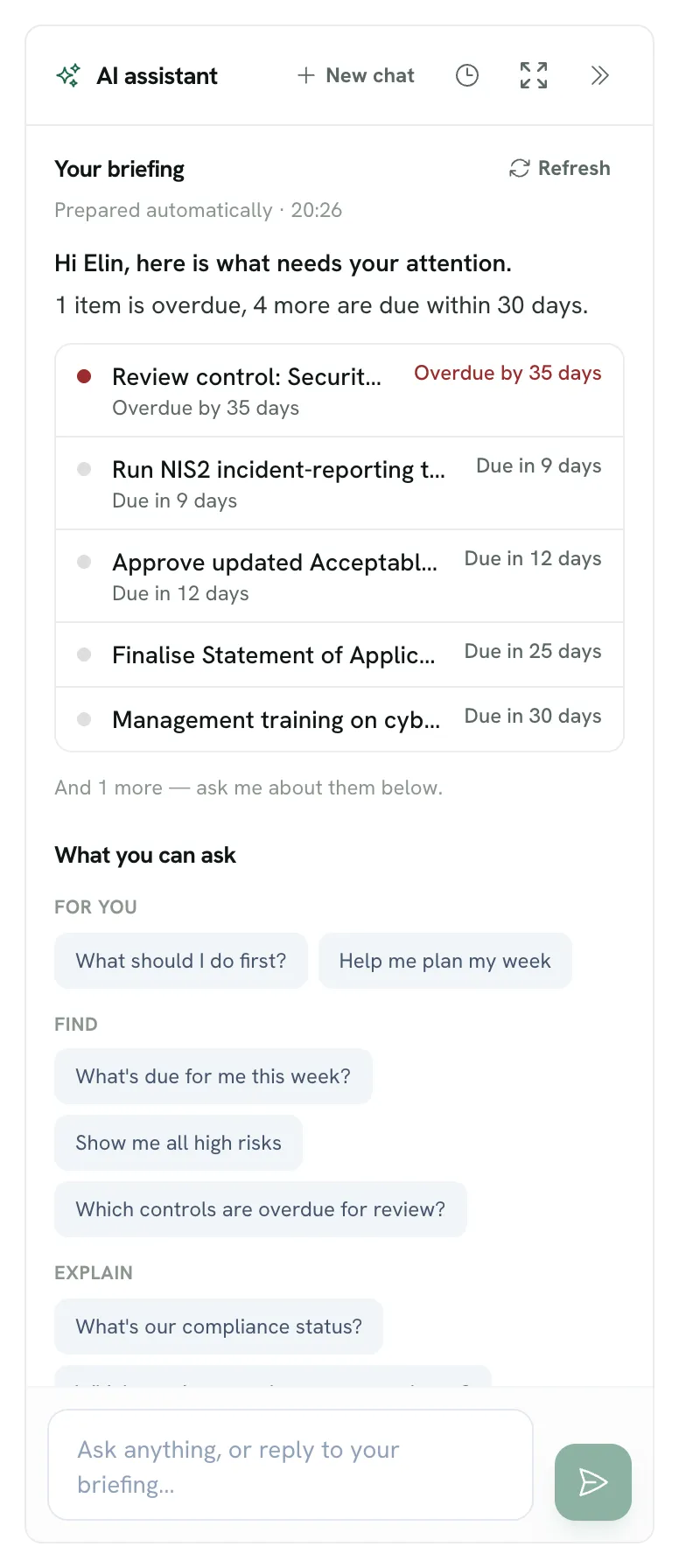
The AI assistant pane: “Your briefing”, prepared automatically, says “Hi Elin, here is what needs your attention. 1 item is overdue, 4 more are due within 30 days.”, followed by a list from a control review overdue by 35 days to a management training due in 30 days.

A briefing built from what is due for you

Open any page and the pane lists what is overdue and due soon for you, so you can ask about it right there.
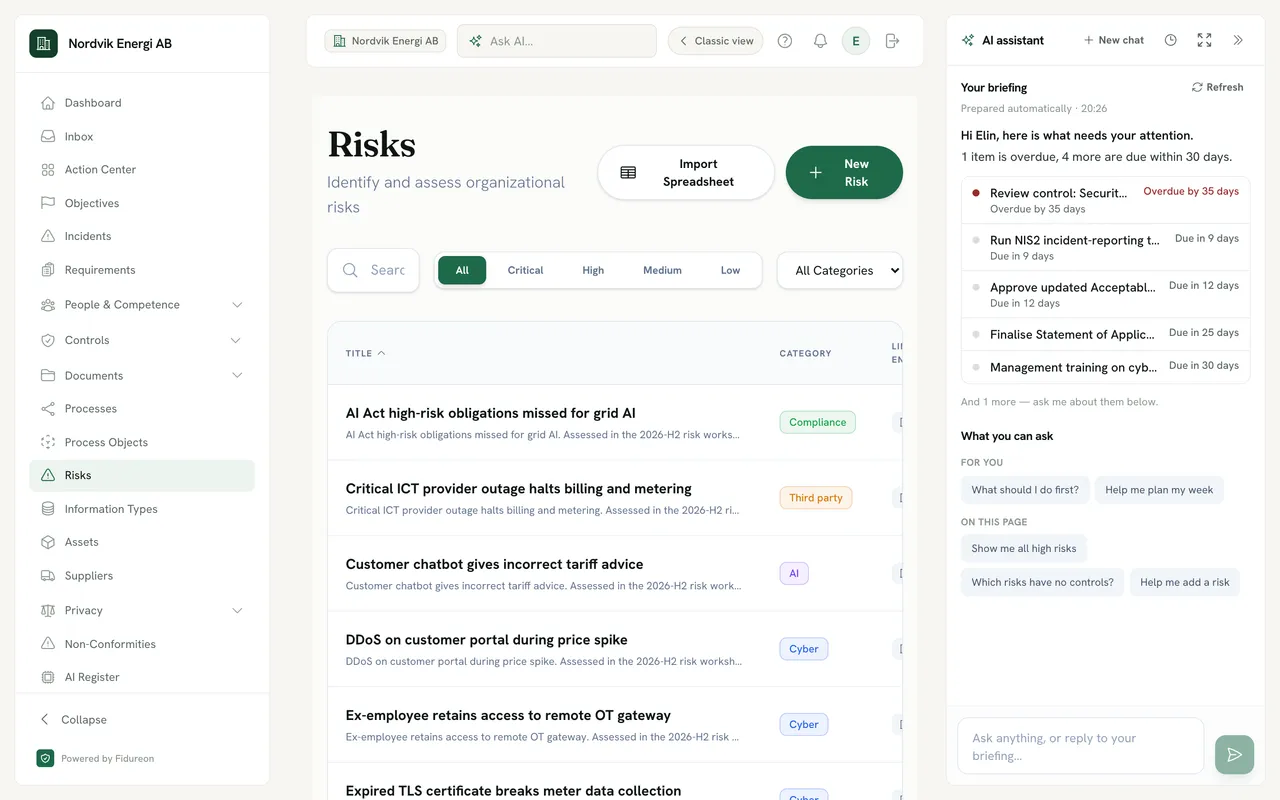
The AI pane on the risk register, “What you can ask”: for you, “What should I do first?” and “Help me plan my week”; on this page, “Show me all high risks”, “Which risks have no controls?” and “Help me add a risk”.

Questions that fit the page you are on

On the risk register it offers risk questions, on controls it offers control questions. Ask in your own words too.

Personalisation

You can teach it who you are.

An admin can describe the organisation: what it does, its industry, size and region. Each person can add an AI profile with why they use Fidureon, their goals, their experience and how short they want answers. Turn personalisation on and the assistant uses both, together with your active frameworks, objectives and role.

Personalisation is off until it is switched on. Each person’s AI profile is visible only to them.
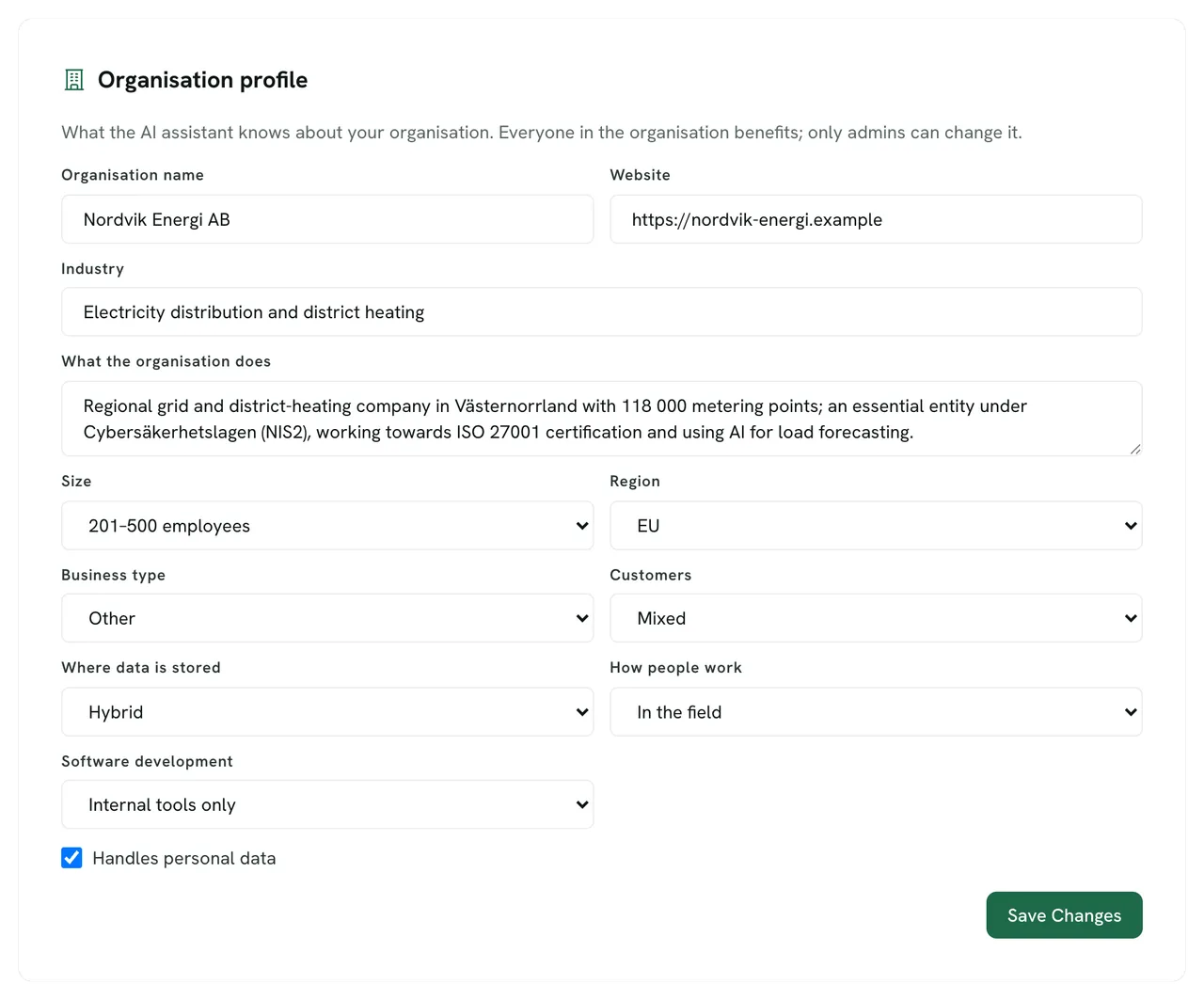
Organisation profile of a demo company: “What the AI assistant knows about your organisation”, with the name Nordvik Energi AB, its website, the industry electricity distribution and district heating, and its size.

The organisation, edited by an admin

Everyone in the organisation benefits; only admins can change it.
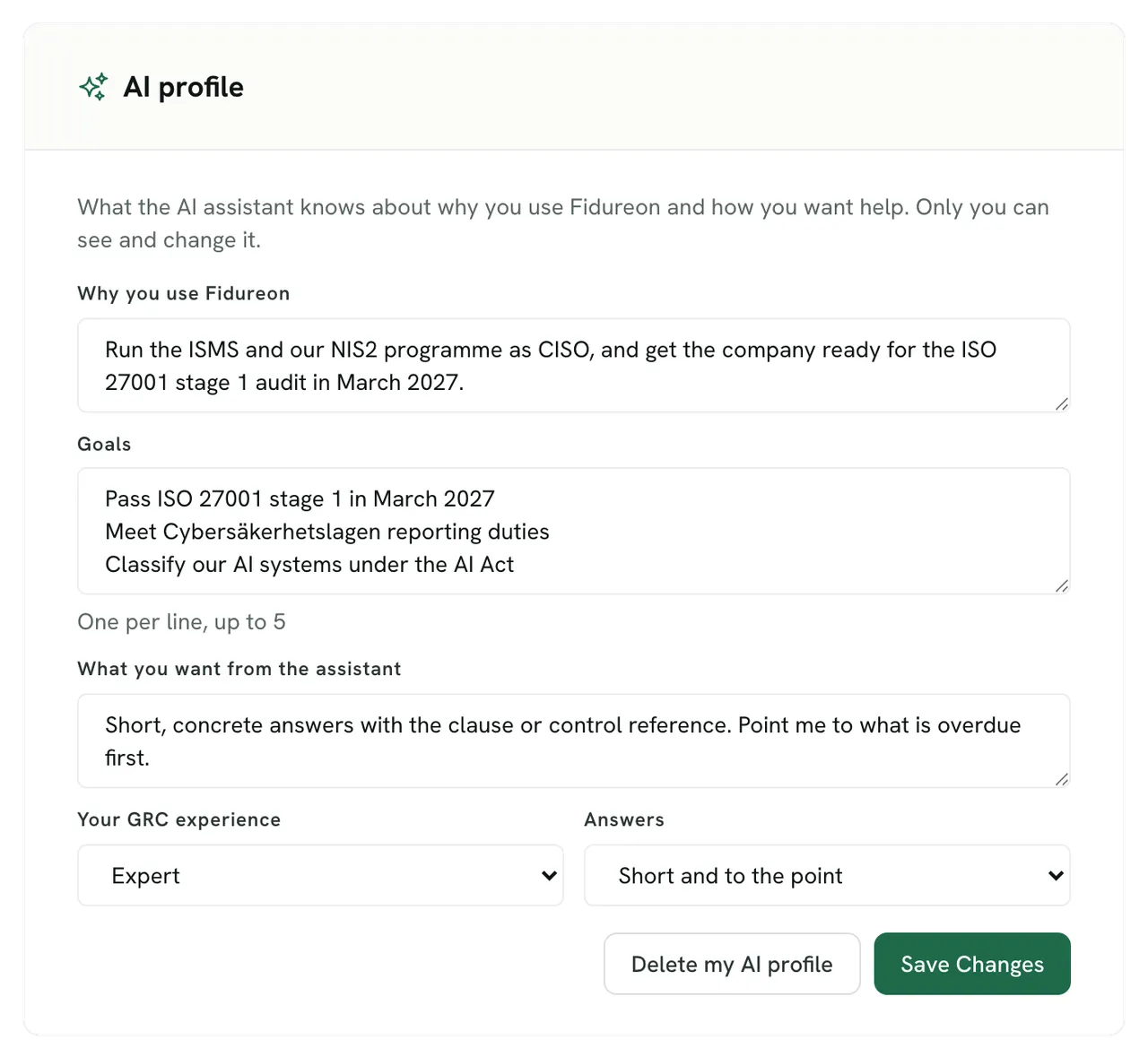
A personal AI profile for a CISO at a demo company: why they use Fidureon, to run the ISMS and the NIS2 programme and prepare for an ISO 27001 stage 1 audit, and three goals.

Your purpose and goals, seen only by you

Tell it why you use Fidureon, what you are working towards and the kind of answers you want.

  • Agents that propose Agents do the continuous work, such as checking evidence against your controls, and propose actions, risks and evidence. You choose how much they do on their own; approved by a person, a proposal becomes an action.
  • An assistant that can act The assistant searches your workspace and can help you add risks, controls, suppliers, assets and processes.
  • Your own AI client, over MCP Connect Claude, ChatGPT or an IDE agent to the Fidureon MCP server, with keys scoped to your workspace and more than 200 tools.

Agents

Questions about the agents.

Do the agents change things without asking?

You decide. The agent that keeps your controls, requirements and risks linked has three autonomy levels, and a new one starts at Hybrid. At Propose & Wait, every change it wants to make waits for a person. At Hybrid, it makes updates and new links itself, while new controls, new risks and removed links go through only when its confidence clears the auto-approve threshold you set. At Full, it acts on its own but still proposes every new control and risk. Its changes and proposals are logged with its reasoning.

Can an agent run on a schedule?

Yes. Start a run whenever you like, or schedule one daily, weekly or monthly at a set time (UTC). A scheduled run looks at where your programme stands and picks the most useful piece of work. Afterwards, its changes are in the log and its proposals wait for you.

Can we use our own AI client?

Yes, through the Fidureon MCP server. Connect Claude, ChatGPT or an IDE agent and use more than 200 tools across risks, controls, frameworks, suppliers, privacy and the AI register. Each API key is read-only or read-write, and scoped to your organisation or to part of your group.

The AI runs on models hosted in EU data centres: Google’s models on Vertex AI in the EU, and selected flows on Mistral, a European AI company.

Controls and actions

Controls run on actions, reviews and evidence.

Every control has an owner and a review cycle. Its health follows the actions that build it, and reviews check that it still works.

An owner and a review cycle

Every control has an owner and a cycle.

Give each control an owning role, a review frequency and method, and link it to the risks it mitigates and the requirements it meets.
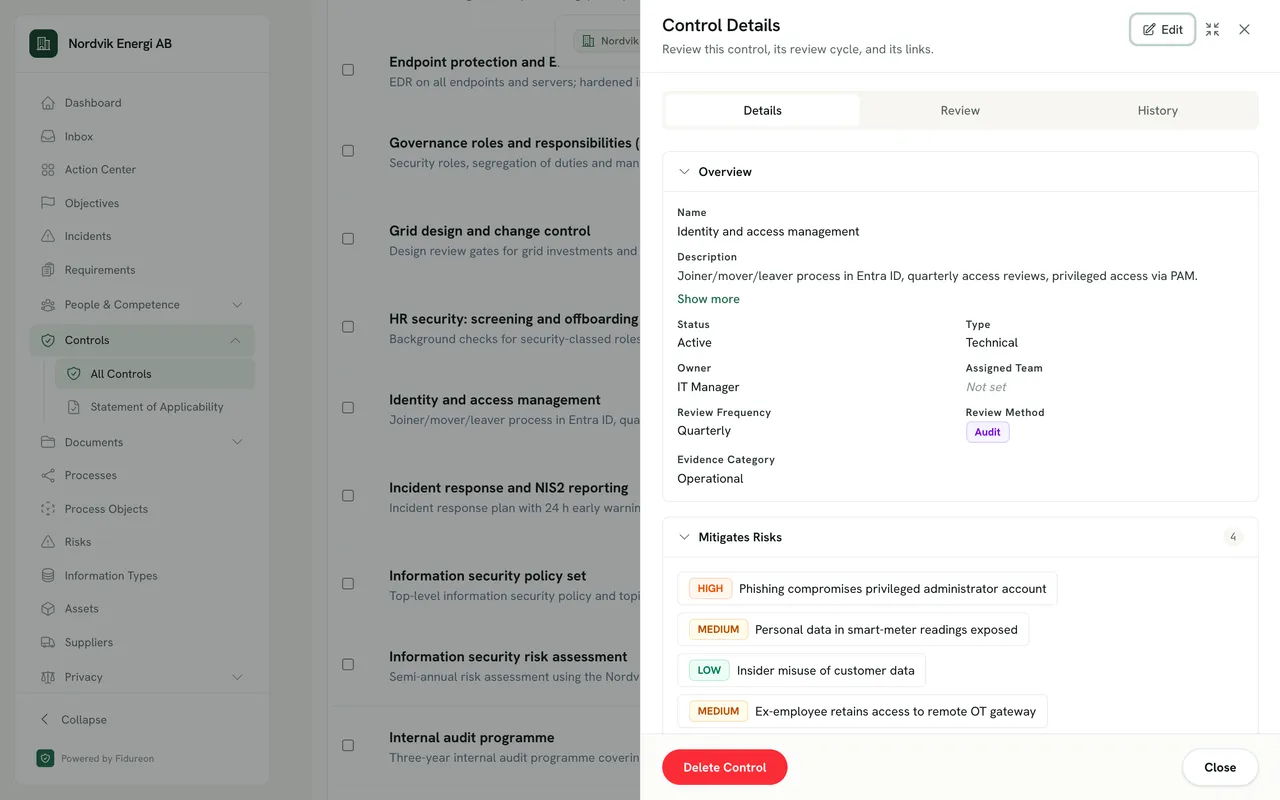
Control detail drawer for “Identity and access management”: description, Active status, owner IT Manager, quarterly review frequency, Audit review method and four mitigated risks with severities.
  1. Every control is owned by a role, here the IT Manager.
  2. How often the control is reviewed, here quarterly, and by which method.
  3. The risks this control mitigates, with their severity.
  1. An owning role. Every control is owned by a role, here the IT Manager.
  2. A review cycle. How often the control is reviewed, here quarterly, and by which method.
A control’s details: owner, review cycle and method, and the risks it mitigates.

Health from the work

Health follows the work. Reviews keep it honest.

A control stays missing or in progress until the actions that build it are done. Reviews can only lower it: the owner’s self-assessment can mark it partially effective or ineffective, and an overdue review marks it at risk.
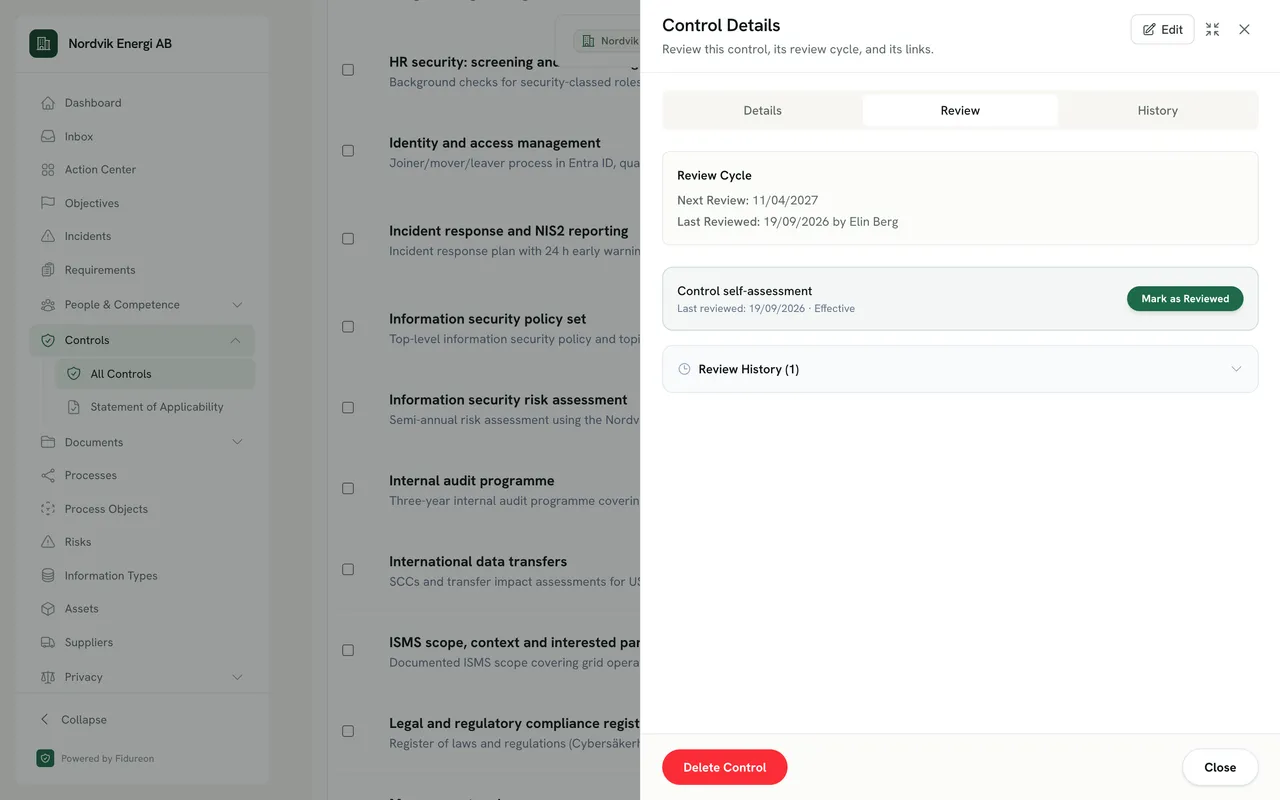
The Review tab of a control drawer: next review date, last reviewed by the owner, a control self-assessment card with outcome Effective and a Mark as Reviewed button, and the review history.
  1. The next review date follows from the control’s review cycle.
  2. The owner records whether the control works. A partially effective or ineffective result lowers its health, and an ineffective one proposes a remediation action.
  3. Every review is kept, with who reviewed and when.
  1. Next review. The next review date follows from the control’s review cycle.
  2. Self-assessment. The owner records whether the control works. A partially effective or ineffective result lowers its health, and an ineffective one proposes a remediation action.
  3. Review history. Every review is kept, with who reviewed and when.
The Review tab: the review cycle, the owner’s self-assessment and the review history.

One inbox for the work

What needs doing lands in one inbox.

Control reviews, actions from your plans and your own recurring tasks, each with an owner and a due date, overdue first.
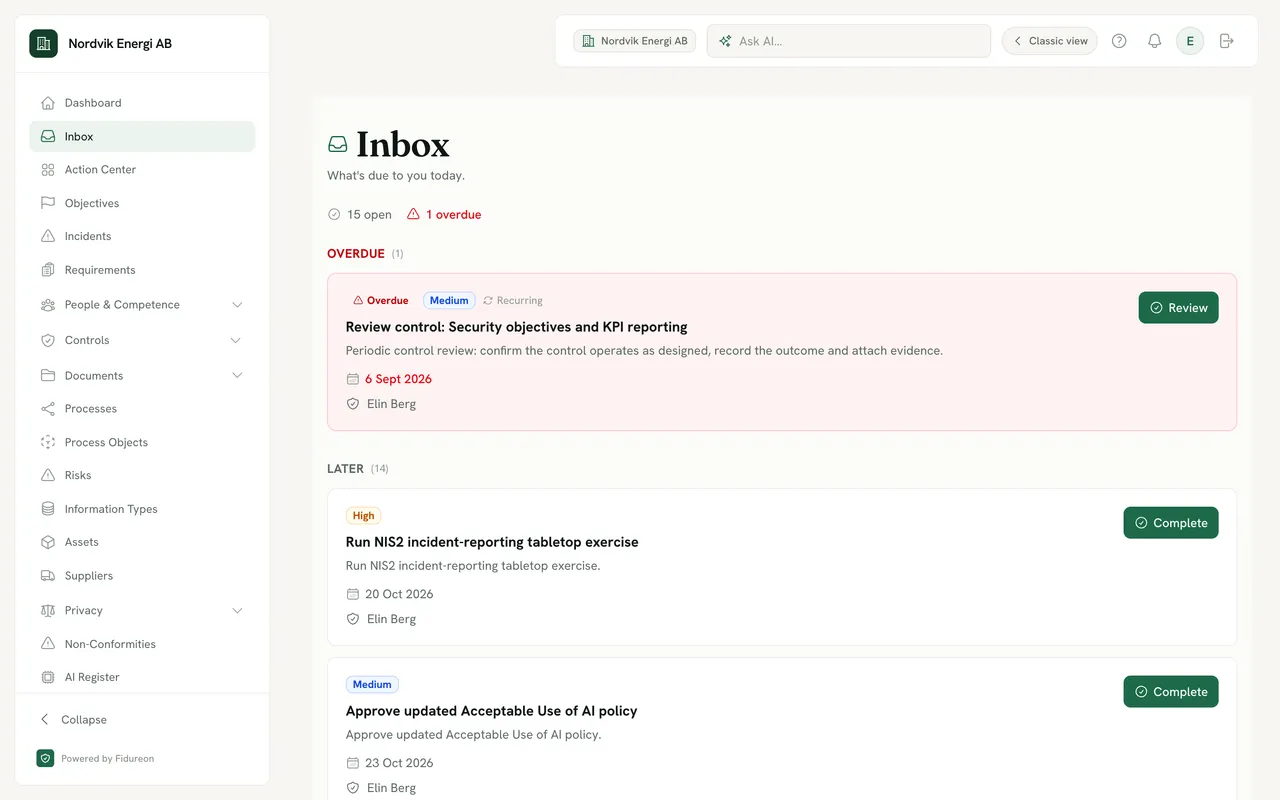
Personal inbox for a user at a demo company: 15 open items and 1 overdue — an overdue control review for security objectives and KPI reporting at the top, then upcoming actions such as an NIS2 incident-reporting tabletop exercise, each with a due date and a Complete button.
  1. What is open for you, and what is already overdue.
  2. Control reviews arrive on their cycle, saying what to confirm and record.
  3. Every item is dated and assigned to a person.
  1. Open and overdue. What is open for you, and what is already overdue.
  2. Recurring reviews. Control reviews arrive on their cycle, saying what to confirm and record.
  3. A due date and an owner. Every item is dated and assigned to a person.
The inbox: what is open and overdue, starting with a recurring control review.

GitHub evidence

Evidence from GitHub, proposed for approval.

Connect GitHub read-only and Fidureon reads repository signals. They arrive as evidence proposals on the right controls, for a person to approve.

  • Branch protection
  • Dependency scanning
  • Secret scanning
  • CI checks
  • Security policy
  • Code review

Risk management

Risk, measured against your appetite.

Score likelihood and consequence before and after controls, and see at once which risks sit above the appetite you set.
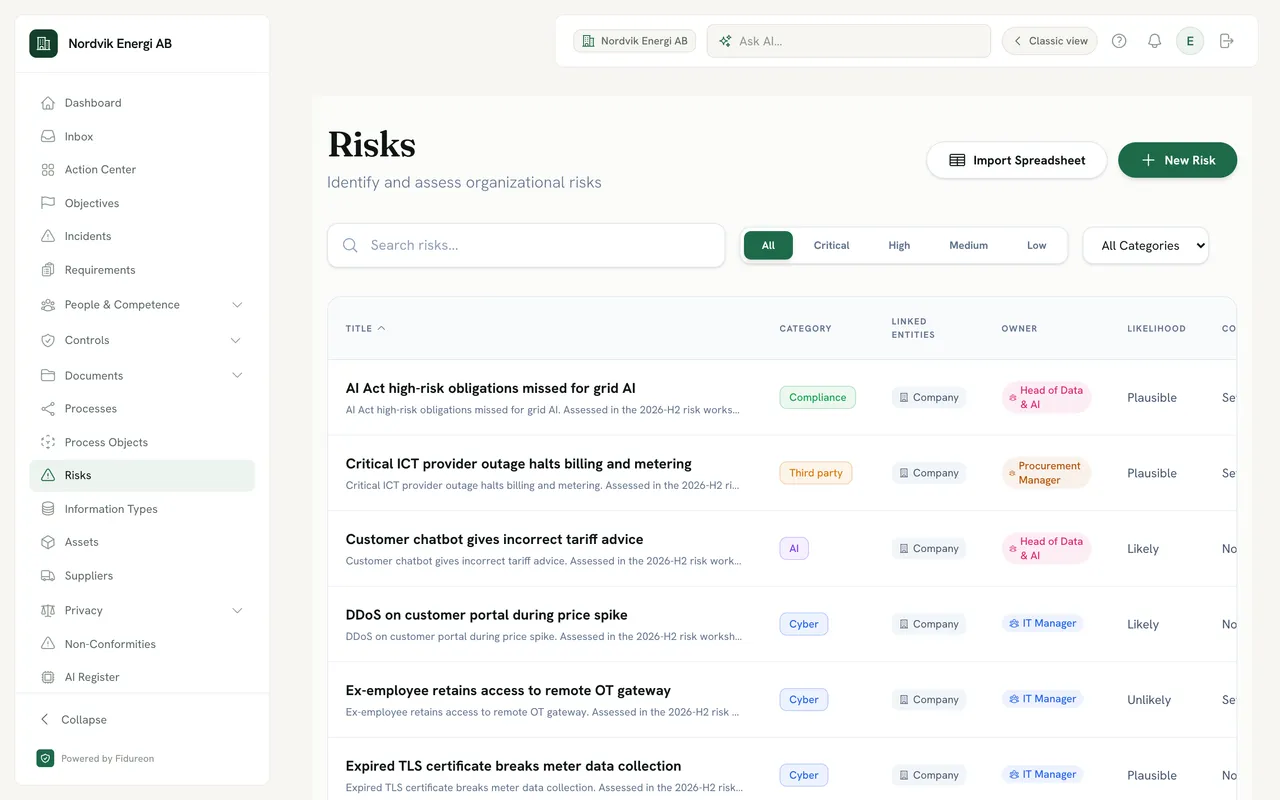
Risk register for a demo company, filtered by severity: risks such as “AI Act high-risk obligations missed for grid AI” and “Critical ICT provider outage halts billing and metering”, each with a description, a category, a linked entity, an owner role and a likelihood.
  1. Each risk has a title and a description, and opens into its owner, strategy, treatment plans and linked controls.
  2. Critical, high, medium or low, with a category filter beside it.
  3. Third party, cyber, compliance or AI: one register for every kind of risk.
  4. Each risk is owned by a role, such as Procurement Manager or IT Manager.
  1. Every kind of risk. Each risk has a title and a description, and opens into its owner, strategy, treatment plans and linked controls.
  2. A category per risk. Third party, cyber, compliance or AI: one register for every kind of risk.
The risk register: a severity filter, a category, an owning role and the likelihood of each risk.The risk register: each risk’s title, description and category.
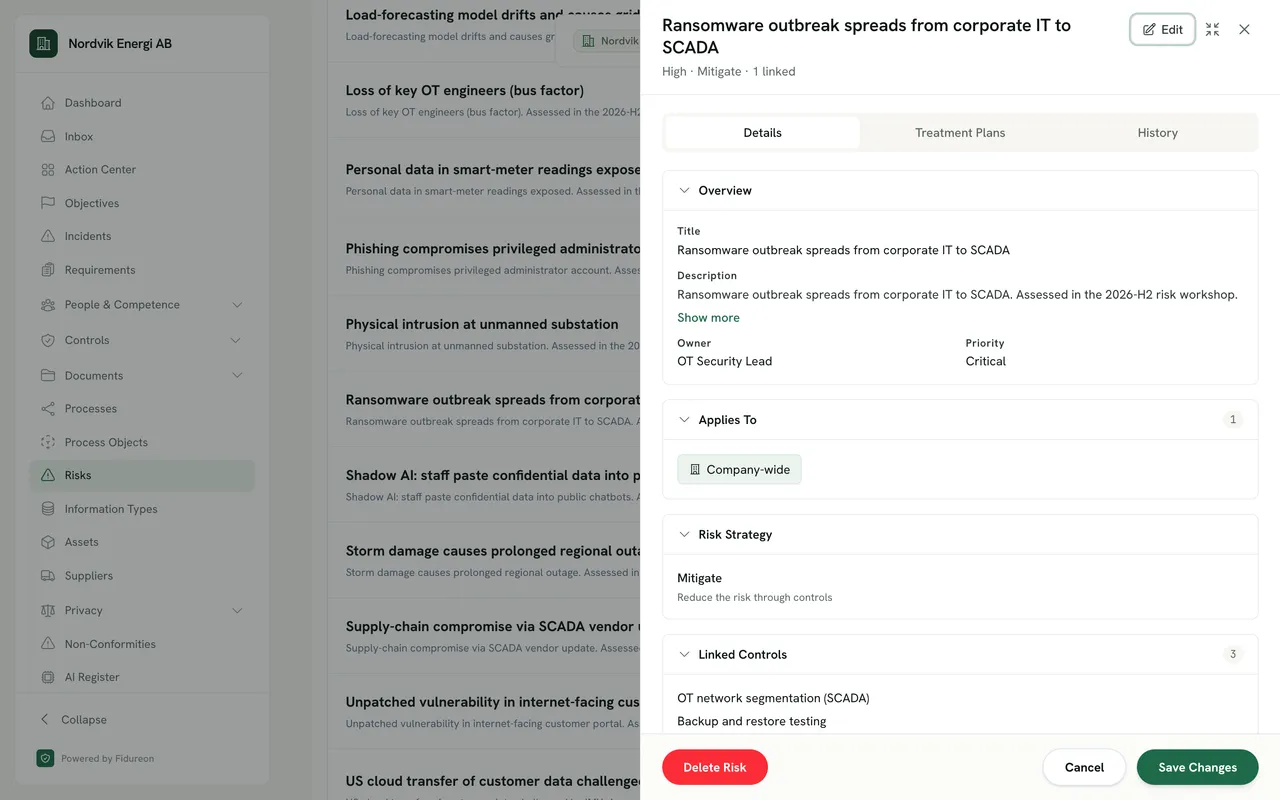
A risk’s overview in a demo company: “Ransomware outbreak spreads from corporate IT to SCADA”, owned by the OT Security Lead, with priority Critical.

An owner and a priority

Each risk has an owning role and a priority, and a history of every change.

The same risk’s strategy, Mitigate (“Reduce the risk through controls”), and its linked controls, such as OT network segmentation (SCADA) and backup and restore testing.

A strategy, carried out by controls

Choose to mitigate, accept, transfer or avoid, and link the controls that do the work.

  • Appetite and breaches Set a risk appetite, and breach indicators flag every risk that sits above it.
  • Acceptances with a review date Record who accepted a risk and why, and when the acceptance must be reviewed again.
  • Treatment plans Treat a risk with controls and actions, link it to the assets, processes, suppliers and AI systems it concerns, and follow the plans in a treatment queue.

Suppliers

Supplier questionnaires, without the inbox chase.

Send a questionnaire, and your supplier answers in a portal built for it. No Fidureon account needed on their side.
  • Questions drafted with AI Let AI draft the questions, or import a questionnaire you already use from Word, PDF or CSV, then keep it as a template.
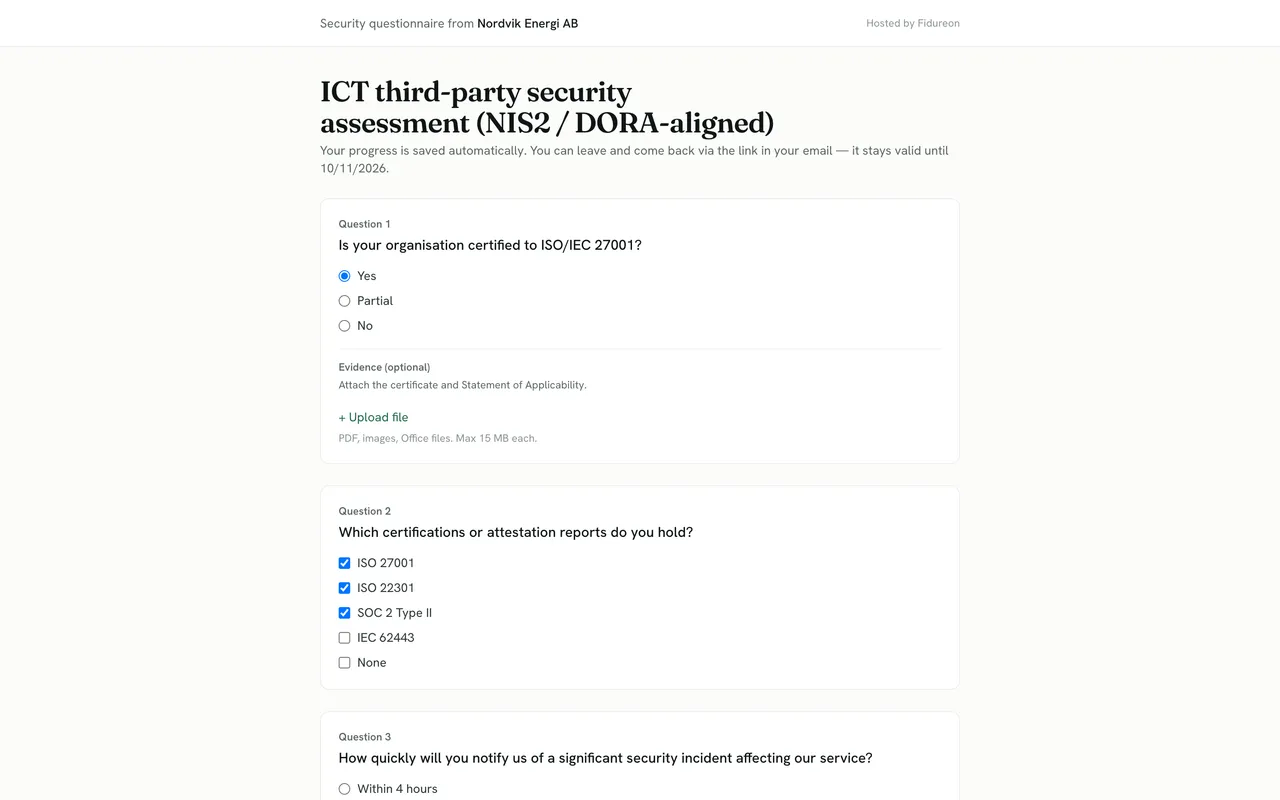
  • Evidence with the answer Suppliers upload evidence straight into the questionnaire.
  • Email replies parsed If a supplier answers by email, the reply is parsed into answers on the questionnaire.
  • Reminders on schedule Unanswered questionnaires get reminders, and suppliers can unsubscribe in one click.
The supplier-facing questionnaire from a demo company, hosted by Fidureon: “ICT third-party security assessment (NIS2 / DORA-aligned)”, a note that progress is saved automatically, and question 1 on ISO/IEC 27001 certification answered Yes, with an optional evidence upload.
What your supplier sees: a hosted questionnaire, progress saved as they go, evidence attached to the answer.What your supplier sees: a question, its answer and an optional evidence upload.

Gap analysis

Gap analysis that ends in a report.

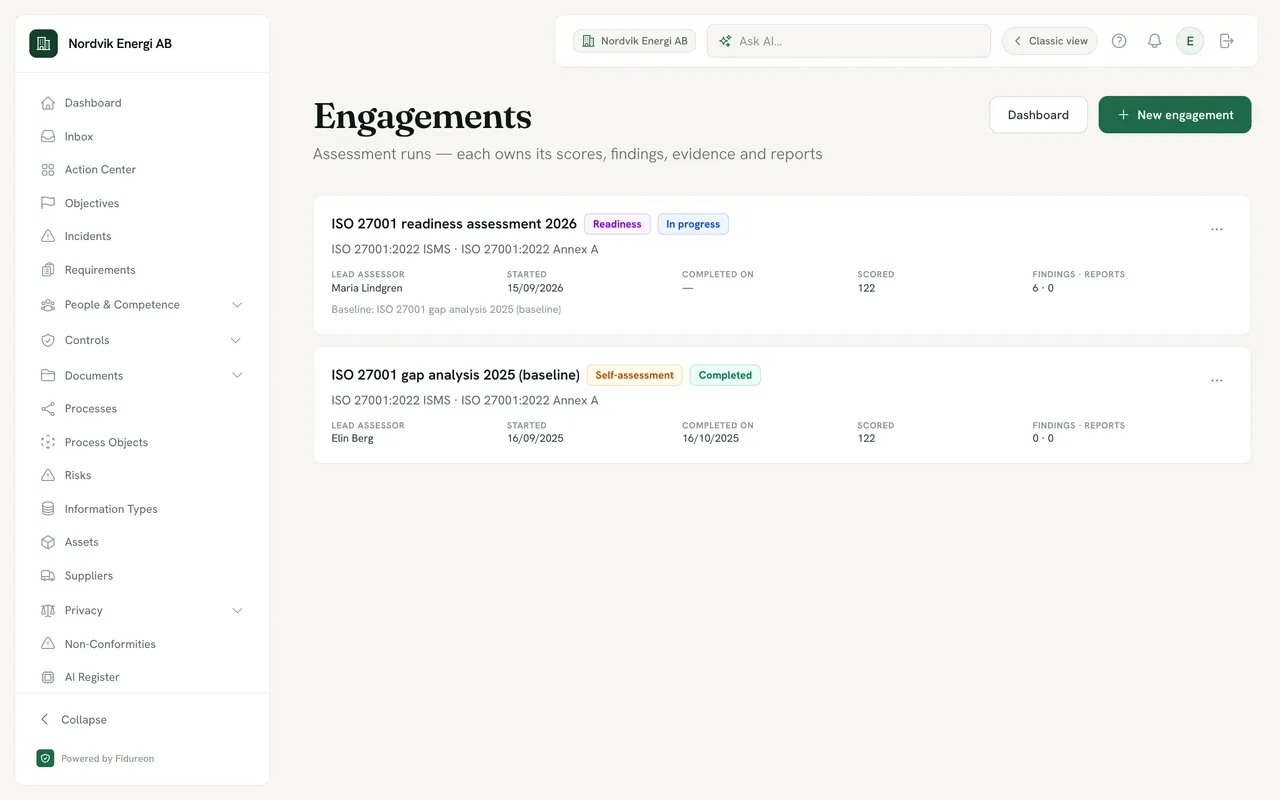
Assess each requirement, record the findings and the evidence behind them, and compare with your last baseline.
  • Self-assessment or partner-run Run an engagement yourself, or let your consultancy run it in your workspace.
  • Branded PDF report Export the engagement as a PDF report with your logo, and the gap analysis as CSV.
  • Start with the free check The free readiness check covers ISO 27001 and the EU AI Act.
Assessment engagements for a demo company: the ISO 27001 readiness assessment 2026, a readiness engagement in progress with lead assessor Maria Lindgren, started 15/09/2026 and compared with a 2025 baseline; below it, the completed ISO 27001 gap analysis 2025 self-assessment.
  1. A new engagement can be compared with an earlier one, here last year’s baseline gap analysis.
  2. A readiness assessment with a lead assessor, or a self-assessment, in progress or completed.
  1. A baseline to compare with. A new engagement can be compared with an earlier one, here last year’s baseline gap analysis.
Engagements: each assessment owns its scores, findings, evidence and reports.

Groups

Every entity in the group, in one tree.

Model the parent company and its subsidiaries, decide which frameworks each must follow, and let each entity run its own work.

Parent company Mandates ISO 27001 Shares policies down, read-only
  • Subsidiary ISO 27001, inherited Adds GDPR Own admins and work
  • Subsidiary ISO 27001, inherited Adds NIS2 (Sweden) Own admins and work
  • Subsidiary ISO 27001, inherited Own admins and work
  • Mandate frameworks Require a framework for every child entity from the parent, and let entities add their own.
  • Entity admins Give each entity its own administrators and invites, and move people between entities.
  • Inherited deadlines Set a first-assessment deadline once and it passes down the tree.
  • Shared documents Share published policies down to subsidiaries, read-only, always the latest version.

Documents and more

The rest of the programme, in the same place.

The management system, policies and documents, language and access, and the framework-specific modules that sit on the same controls.

Document control

The documents an auditor asks for first.

Scope, context, interested parties, management review and audit programme, each with a reference, a category, an owner and a status. Draft, compare and restore versions, collect approvals, and export to PDF or Markdown.
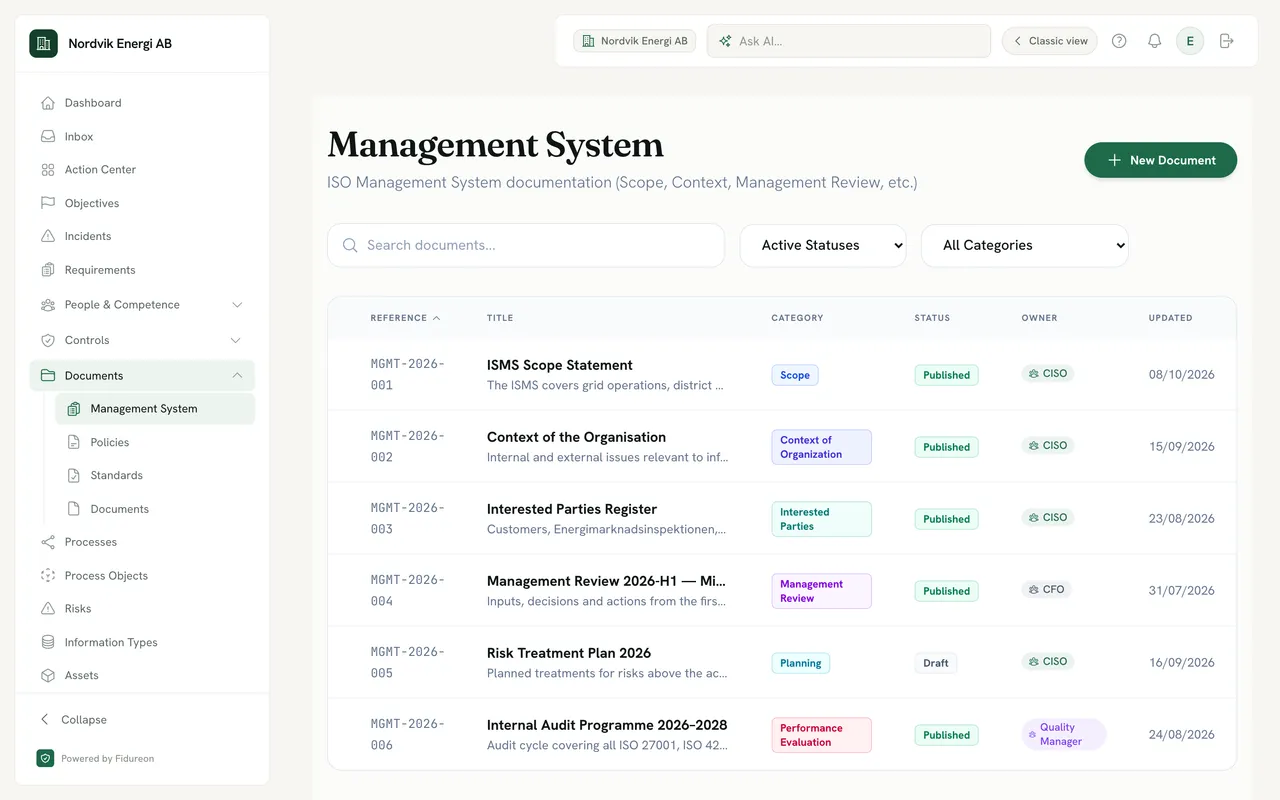
Management system documents for a demo company: ISMS scope statement, context of the organisation, interested parties register, management review and risk treatment plan, each with a short description, a category and a status, Published or Draft.
Management system documents, each with a category and a status, Published or Draft.Management system documents: scope, context, interested parties, management review and the risk treatment plan.
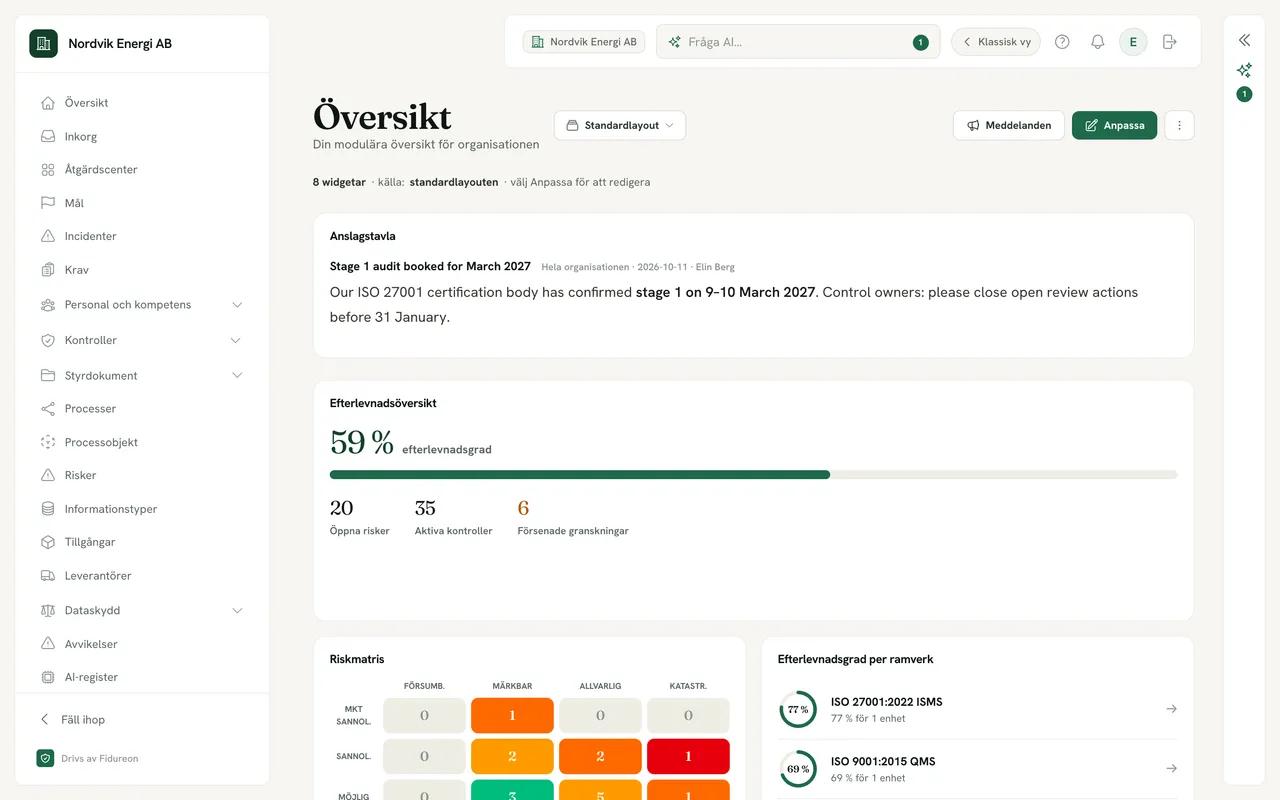
The Swedish interface of the demo company’s app: navigation items Översikt, Inkorg, Åtgärdscenter, Mål, Incidenter and Krav.

Use it in Swedish or English

The new Fidureon app is fully translated into Swedish; each person picks their language.
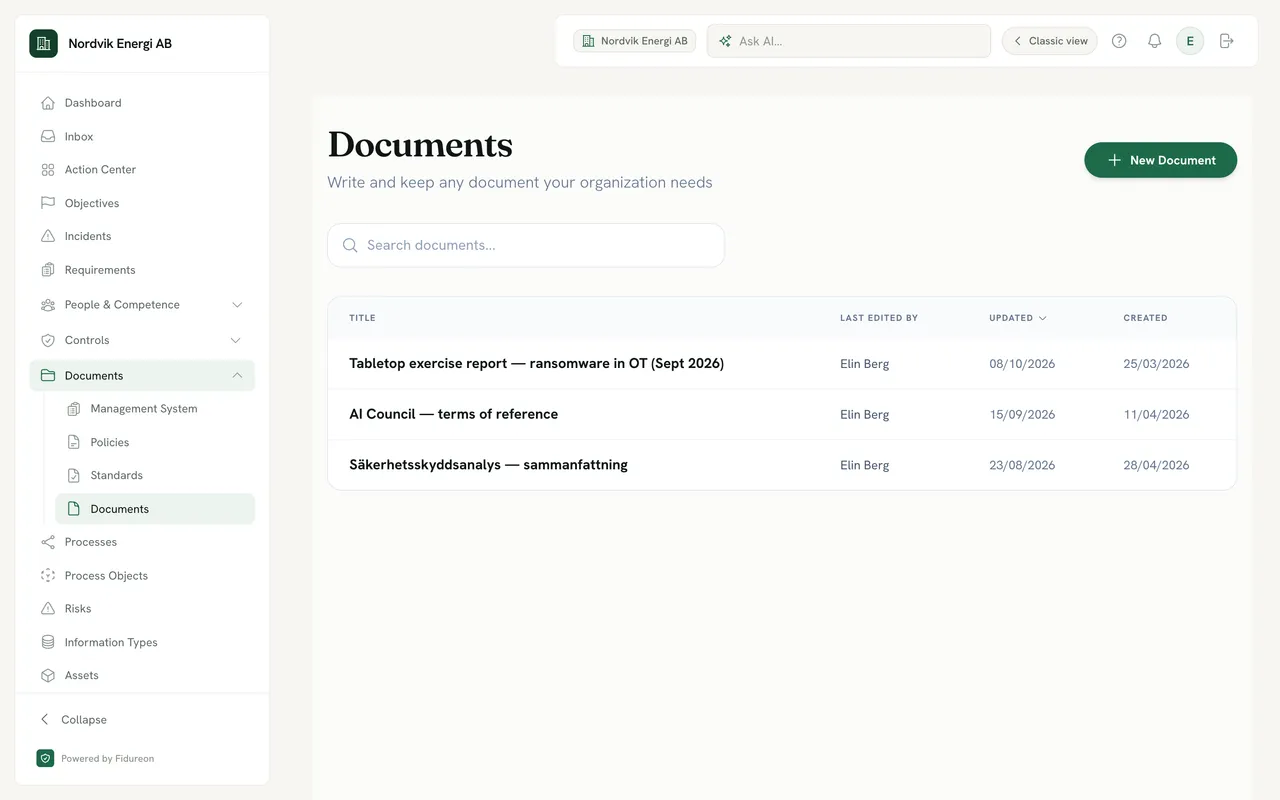
Free-form documents of a demo company: a tabletop exercise report on ransomware in OT, AI council terms of reference and a Swedish-language security analysis summary.

Free-form documents too

Exercise reports, terms of reference and anything else your programme needs, beside the controlled documents.

Dashboards

A dashboard for each role.

Add, drag and resize widgets, save views, and give each role a layout its people start from. A notice board keeps the whole workspace informed.

Framework modules

Built on the same controls.

Of the seven frameworks, six are requirement catalogues your controls link into, some with registers and exports of their own. DORA is a module rather than a catalogue: an ICT third-party register and an export of the 4 core Register of Information templates.

FAQ

Platform questions.

Do we have to use every module?

No. Frameworks and modules are switched on per workspace, so you start with the ones you need and add others later. When you book a demo we will go through which ones fit your scope.

Does drawing a process fill in our registers?

Drawing alone never adds a register entry. On the canvas you pick an existing asset, information type, supplier or AI system, or create one with Quick Create, which makes the record and links it in one step. When you save, Fidureon links the process to those records and derives the links between them from the diagram, and processes marked as personal-data processing appear in your Article 30 register.

Does the AI assistant know about our organisation?

Only what you choose to tell it. An admin can describe the organisation and each person can fill in a private AI profile with their purpose, goals and preferred kind of answers. With personalisation switched on, the assistant uses both, along with your active frameworks, objectives and role. It is off by default.

Does Fidureon map controls between frameworks for us?

You link each control to the requirements it meets, in any framework you run. You can do it by hand, or accept AI suggestions when you import controls from documents or spreadsheets. Every link is one your team has decided on.

Where does the compliance number come from?

It is derived from the actions behind your controls and requirements, so it moves when work is done, not when someone edits a status. Each requirement shows why it is where it is, down to the actions that are done, open or overdue.

How is a control’s health worked out?

From its actions. A control is missing or in progress until it is implemented and the actions that build it are done. After that, the owner’s self-assessment can mark it partially effective or ineffective, and an overdue review, stale evidence or a failed automated evidence collection marks it at risk. A review never makes a control healthy on its own.

Which tools does Fidureon collect evidence from automatically?

GitHub. The connector reads signals such as branch protection, dependency and secret scanning, CI and code review, and turns them into evidence proposals that a person approves. Other evidence is uploaded to the control or review it belongs to.

Do suppliers need a Fidureon account to answer a questionnaire?

No. They open the questionnaire from a link, answer in the supplier portal, save their progress and attach files to their answers. If they reply by email instead, the reply can be parsed into answers.

Is the app available in Swedish?

Yes. The new Fidureon app is fully translated into Swedish, and you can use it in Swedish or English.

How is access to Fidureon secured?

Every user can turn on TOTP multi-factor authentication with backup codes, on every plan. Single sign-on over SAML or OIDC is on Enterprise.

See the platform on your own scope.

Book a demo and we will walk through the modules that fit your frameworks. Or start with the free readiness check for ISO 27001 or the EU AI Act.